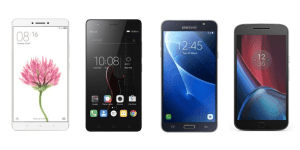

BEST PHONES UNDER 15,000 RS IN INDIA 2017

//pagead2.googlesyndication.com/pagead/js/adsbygoogle.js
best-phones-under-rs-15000


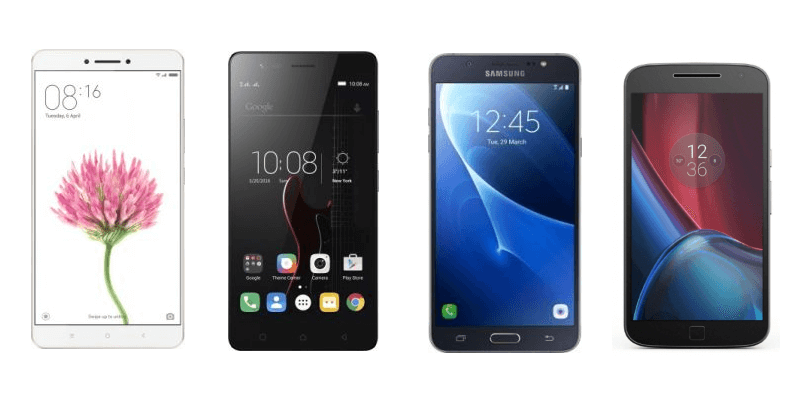
TOP BEST PHONES UNDER 15,000 RS IN INDIA  2017

  ØThinking of Buying an android smartphone under Rs. 15,000, then there are plenty of android Phones in the market.

  ØConsidering the price of the smartphone you can’t expect high performance specification.

  ØThis year Smartphone Company is mainly focusing on two main features smart phones that support 4G LTE connectivity and 720p displays resolution.

  ØSome smartphones offer decent cameras, quad-core chipset processor, 2GB Ram and a pretty good battery backup.

  ØLet’s take a look on the Android Smartphones you can buy this year
under 15,000 rs.

  1. Xiaomi Redmi Note 4


best-phones-under-rs-15000

Xiaomi has launched the cheapest 4G android phones in India.

This SmartPhone has a pretty good specification when price is considered.

You can’t buy this phone from mobile store; instead you have to buy this phone online.

Specification :-

  Ø 5.5 inch IPS Capacitive display screen with 1080 x 1920 pixel
display resolution.

  Ø Android 6.0 OS

  Ø 4G support

  Ø 2 GHz Snapdragon 625 Octa-Core Processor

  Ø 13 MP Rear and 5 MP front Camera

  Ø    64 GB internal storage

  Ø    4 GB RAM

  Ø   4,1000 mAH battery, non-removable

      Redmi Note 4 (Dark Grey, 64 GB) (4 GB RAM) – 12,990


  1. Lenovo Z2 Plus

    lenovo-k5-note-pa330118in-original-imaekyaqxwzfhacu

     Lenovo is the other brand that has been releasing amazing handsets in this budget.

     Lenovo Z2 Plus is probably the best phone under 15,000 with decent features. 

Specification:-

  Ø 5 inch HD IPS display

  Ø Android Marshmallow 6

  Ø 2 x 1.6 GHz & 2 x 2.15 GHz Snapdragon 820 Quad core Processor

  Ø 13 MP Rear Camera

  Ø 8 MP selfie camera

  Ø 32 GB internal storage

  Ø 3 GB RAM

  Ø 3,500 mAh battery
                        Lenovo Z2 Plus (Black, 32 GB) (3 GB RAM)


  1. Moto G4 Plus
    motorola-moto-m-xt1663-original-imaep562bebk6hhg

     Motorola has introduce another amazing handset in the Rs. 10,000 to Rs. 15,000 price segment.

    Moto G4 is the one of the moto series model to get the Android Nougat Updates. 

Specification :-

  Ø Android 7 Nougat OS

  Ø Display 5.5 inch, IPS with 1080 x 1920 pixel display resolution

  Ø 16GB internal storage

  Ø 1.5 GHz & 1.2 GHz Coetex A53 Snapdragon 617 Quad-core
Processor

  Ø 2GB RAM

  Ø Camera 16MP rear and 5 MP front

  Ø Battery 3,000mAh,

                 Moto G Plus, 4th Gen (Black, 32 GB) – 15,999


                        Moto G Plus, 4th Gen (Black, 16 GB) – 12,499


  1. CoolPad Max


510201662057PM_635_coolpad_max

Specification:-

  Ø 5.5 inch LCD Capacitive IPS display with 1080 x 1920 pixel
display resolution

  Ø Android 5.1

  Ø 1.5 GHz  Snapdragon Qualcomm 617 Octa-core Processor

  Ø 13 MP Rear Camera with LED Flash

  Ø 5 MP selfie camera

  Ø 64 GB internal storage

  Ø 4 GB RAM

  Ø 2,800 mAh battery 

                    Coolpad Max A8 (Gold, 64 GB) (4 GB RAM) – 13,999


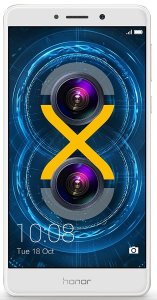
  1. Honor 6X

81nu743xBHL._SL1500_


Specification:-

  Ø 5.5 inch HD display with 1920 x 1080 pixel display resolution.

  Ø Android Marshmallow 6.0

Ø 4 x 1.7 GHz & 4 x 2.1 GHz cortex A53  Octacore Processor kirin             655 Processor.

  Ø    12 MP + 2 MP Rear Camera

  Ø 8 MP selfie camera

  Ø 32 GB internal storage

  Ø 3 GB RAM

  Ø 3,340 mAh battery

           Honor 6X (Gold, 32GB) – 12,999


         Honor 6X (Gold, 64GB) – 15,999


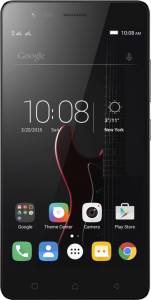
  1. Lenovo Vibe K5 Note

Specification:-

  Ø 5.5 inch IPS screen, with 1080 x 1920 pixel display resolution.

  Ø Android 6.0 OS

  Ø 1.8 GHz Mediateck 6755 Octacore Processor

  Ø 13MP Rear Camera 

  Ø 8 MP selfie camera

  Ø 32 GB internal storage

  Ø 4 GB RAM

  Ø 3,500 mAh battery

  Ø 4G VoLTE

               Lenovo Vibe K5 Note (Grey, 32 GB) (4 GB RAM) – 11,999 

           Lenovo Vibe K5 Note (Grey, 64 GB) (4 GB RAM) – 12,999


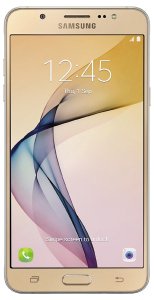
  1. Samsung Galaxy On8

71mtqsPn0HL._SL1500_


Specification:-

  Ø 5.5 inch HD IPS display with 1920 x 1080 pixel display resolution.

  Ø Android Marshmallow 6.0

  Ø 1.6 GHx S5E7580 Exynos 7580 Octacore Processor

  Ø 13 MP Rear Camera

  Ø 5 MP selfie camera

  Ø 16 GB internal memory expandable upto 128 GB.

  Ø 3 GB RAM

  Ø 3,300 mAh battery

  Ø 4G VoLTE

                            Samsung Galaxy On8 (Gold) – 13,490


  1. LeEco Le 2

leeco-le-2-le-x526-original-imaeh9dajce9wqvh

Specification:-

  Ø 5.5 inch HD IPS display with 1080 x 1920 pixel resolution.   

  Ø Android  6.0 OS
Ø 1.8 GHz (A72) & 1.4 GHz (A53) Snapdragon 652 Quadcore
Processor

Ø 16 MP Rear Camera with LED Flash,
Ø 8 MP selfie camera
Ø 32 GB internal storage
Ø 3 GB RAM
Ø 3,000 mAh battery
Ø 4G VoLTE

                     LeEco Le 2 (Grey, 32 GB) (3 GB RAM) – 11,999


  1. Moto M

motorola-moto-m-xt1663-original-imaep562bebk6hhg

Specification:-

Ø Android 6.0 OS

  Ø Display 5.5 inch, IPS with 1080 x 1920 pixels screen resolution

  Ø 32 GB internal Storage

  Ø 2.2 GHz A53 Mediatek Helio P15 octacore processor

  Ø RAM 3 GB

  Ø Camera 16MP rear and 8MP front

  Ø Battery 3,050 mAh

  Ø Connectivity Dual SIM, 4G

                                   Moto M (Silver, 32 GB) (3 GB RAM) – 15,999

  1. Infocus Epic 1

813ug0POO8L._SL1500_

Specification:-

  Ø 5.5 inch HD display with 1080 x 1920 pixel resolution.

  Ø Android 6.0 OS

  Ø 1.2.1 GHz  MediaTek MT6797 deca Processor

  Ø 8 MP Rear Camera with LED Flash

  Ø 5 MP selfie camera

  Ø 32 GB internal Storage (128 GB expandable)

  Ø 3 GB RAM

  Ø 3,000 mAh battery

  Ø 4G VoLTE

                           InFocus Epic 1 (Gold, 10 Core) – 12,999


  • So these  are the best phones under 15,000 In India.
  • I will update my blog every month as soon as new smartphone is launched.
  • If you have any doubts just let me know by commenting down below .
  • Hope this helps to find the best phone under 15,000.
Android Nougat

zjhl2lgef9cyrql0jfa7kzbw2vucrb5knhfe1td9oxde9g5shnn1i-bv9ettdv9dsbugw0py


Android Nougat


Install-android-nougat.jpg


  • Android 7.0–7.1.1 “Nougat” also known as N is the 7th version of the Android operating system.
  • It was officially released on August 22, 2016, with Nexus devices being the first to receive the update, but LG V20 was the first new smartphone released with Nougat.
  • On June 30, 2016, Google announced that N’s release name would be “Nougat”.
  • Android 7.0 was officially released on August 22, 2016, with the Many Nexus models to receive the update.

Features

1. Multiple Windows View in the Same Screen

  • Nougat has introduces Multi Windows view where you can snap two apps to occupy halves of the screen.
  • You can watch movies and read, write text at the same time.

2. Quicker multi-tasking


  • You can now double-tap the recent apps button to quickly switch between your two most recently used apps.


3.Doze

  • Doze is the new feature that comes in the Marshmallow Operating System.

  • It has a feature called hibernation, it is enable by default on your phones.

  • Phones enter into hibernation mode if it is not use for long period of time.

  • It help your phone to get much more out from your phone battery.


4. Security

  • New version of Android is built with powerful layers of security and encryption to keep your private data private.
  • Few of the latest devices has software updates download in the background, so you won’t have to wait while your device syncs with the latest security tools.
  • Android N can better isolate and protect files for individual users on your device by adding encryption to the file and data of the user.


  1. OS with additional Emoji and Desired languages

  • Android Nougat has over 1500 emoji including 72 new emoji.
  • Also it has multiple local language support setting for using your device with your desire language.

  1. Experience new Gaming Experience

  • Vulkan API is the new gaming interface introduce in Android Nougat.
  • Vulkan API is the high-performance 3D graphics interface that show sharper graphics crystal clear image, videos and gaming effects.

  1. Reply within the Notification

  • Now you can reply to any whatsapp, face book or twitter message within the notification without even opening the apps.
  1.  Data Saver

  • Restrict the user of data device uses with Data Saver option.
  • When Data Saver is turned on, apps in the background won’t be able to access mobile data.

  1. Drag and drop text, images in Multi-window mode

  1. Lock screen gets a wallpaper of its own

  2. Where did that APK come from?

  1. Notification importance setting

  • You can now set the importance level of an app’s notifications to fit your specific use of that app, including allowing an app to ignore your DND settings.
  • With a long-press on a notification, you can view the current importance level.
  • Tap on More Settings where you can turn off the default automatic setting, and adjust its interruption level.
  • As you move the slider, a brief explanation will detail each alert type.
  1. Cancel button for app downloads

  1. Keyboard shortcut helper

Tips for Increasing Smart Phone Battery Life.

maxresdefault

Useful

Tips to increase your Mobile battery life?

  • Android Phone are powerful but it’s tough to go much longer than a day without charging your phone.
  •  A number of factors have conspired to reduce the battery life of your phone over the past several years.
  • Faster Quad-Core Processor, thin & slim Designs, larger and brighter Amoled display, Wi-Fi & GPS and other software that runs in the background, all these are responsible for draining your phone battery.
  • Now a days the move of networks from 2G to 3G and now from 3G to 4G LTE has become one of the reason for less battery life.
  • Many people goes for the portable USB power banks, which can be used to charge your phone on the go.
  • My aim is show you how to reduce your Mobile power consumption and increase the battery life of your mobile phones.

Here are Some Tips that will Surely Benefit You to Increase your Smartphone Battery Life

  1. Turn Your Smartphone OFF when not in Use:-

power-off

  • This is the simplest and the most effective ways of conserving your smartphone battery power.
  • You can switch off you phone when you are in no reception zone or you are in sleep or you don’t want to answer the phone are office hour.
  • This will save a quite a good amount of energy in your phone battery.
  1. Avoid the Crappy Method of Full Charging & Discharging

650x300xbattery-levels-jpg-pagespeed-gpjpjwpjjsrjrprwricpmd-ic-7a5ucdpjkn

  • Smartphones battery are made up of either Lithium-ion or Lithium Polymer.
  • The main advantage of Lithium-ion battery is that you can charge them at any time at any level.
  • You don’t have to drain the battery completely, then charge it to 100 percent.
  • Lithium battery which are used in most of the smartphone are designed to be charged early and often.
  • Full Charging – Discharging method goes for only Nickel based batteries.
  • Letting your Lithium Battery too low or fully discharged can surely damage your battery.
  1. Turn Off the Phone’s Back Light
  • I know the back light is what makes the smartphone display easier to operate in bright shinny light or outside.
  • Reduce the amount of time to leave the back light on, usually 5 seconds is sufficient.
  • Smart Phone with ambient Light Sensor has the ability to turn off the back light of the phone in the bright condition and enables it in the dark.
  1. Avoiding using Unnecessary Feature

turn-off-wifi-bluetooth-etc

dfg


  • The moment you know you battery is about to die in couple of minutes. Don’t use camera to click photos or use Internet for surfing or downloading.
  • Smart Phones Camera Flash light can drains amply amount of energy from the battery.
  • Turn off Bluetooth, it will drain your battery very quickly. Turned it ON only when you need it.
  • Turn off WI-FI, GPS, and infrared, when you don’t want use it. Turned it ON when you need to use it.
  1. Reduce the Brightness of the Display to lowest 

    screenshots-android-batterybrightness


  • Never check the option auto for brightness, uncheck the auto option & manually turn the brightness to lowest setting according to your choice.
  • Use dark colored or black wallpaper for your phone, it can increase the battery life.
  • Phones with Amoled screen should use black wallpaper, as it required less power to light them up. (you can download black wallpaper from Google Play Store)
  • Never use live wallpapers or animated picture for your phone background it will drain the battery faster.
  • This is one of the best ways to improve your battery life, because the screen is one of the biggest battery suckers.
  1. Adjust Your Network Setting  ddddfdfd
  • Use 3G or 2G network rather than 4G (LTE) network all the time, it will drain the battery quicker than you expected.
  • If the 4G signal is weal or there is no signal at all turned it off.
  • Turn off the NFC and Mobile data when you don’t need them.
  • Turn off the Phone, when you are in no cell service as your phone will constantly find a mobile tower to which it can connect for. This is drain large amount of energy from your phone battery.
  1. Doze
  • Doze is the new feature that comes in the Marshmallow Operating System.
  • It has a feature called hibernation, it is enable by default on your phones.
  • Phones enter into hibernation mode if it is not use for long period of time.
  • It help your phone to get much more out from your phone battery.
  1. Use Greenify index
  •  Greenify is app that optimize the performance of your phone and can increase the phone battery life significantly.
  • This app allows user to put other apps into hibernation when they are not in use. This will boost the battery performance.

9.  Set your ‘Do Not Disturb’ or ‘sleep’ schedule

android-l-do-not-disturb

  • Set sleep time or blocking mode to switch off Wi-Fi and mobile data when you don’t need them.
  •  If your phone is basically off limits at work, set your device to not ring, vibrate or connect to the internet while you’re at work.

10.  Don’t get Fooled by widgets

images

  • Never use a widgets that you don’t need and especially those one that required internet connection.
  • Never keep multiple widgets on your home screens (Social Networking, or Mails) that required continuous sync. It will drain your phone battery much faster.

11.Don’t fall into the auto-sync trap

accounts-sync

  • Turn off the auto sync option for your Google account, if you don’t need your Google account to sync every time you connect on internet.
  • Same goes for social networking sites, just turn the sync option on when you actually want to use the app.

12.  Explore the battery saving features on your phone
er

  • Almost all ROM have different setting in the menu to turn on the battery saver
    option that will optimize the battery life.
  •  Make us of the inbuilt battery saver mode for your phone, if incase it’s not install
    then download it from Play store.

13.  Update all installed app

  • Application often get new update to use less battery power, that why we have to update our install apps whenever required.
  • Check for app updates in Google Play by hitting the menu key and going to My Apps.
  1. Turn OFF the Background Running app
  • Many apps that are running in the background is using processing power from battery.
  • Even if you are not using that app at that time they are running in background using the energy from battery to run.
  • Android is pretty good at managing these apps and automatically closing out ones that aren’t used for an extended period of time.
  1. Keep the battery cool.
  • Battery will last longer if we used near room temperature.
  • Avoid leaving your phone in hot temperature or in direct sunlight.
  • Most importantly, check the battery while it’s charging. If it seems excessively hot, then your charger may be malfunctioning.

Battery Failure Indicators

Know how to avoid battery failure:

  1. The usable time after recharging is shortened.
  2. Charge your smartphone with the charger that is compatible for your device.

  3. The battery becomes unusually warm during a recharge cycle.
  4. The battery becomes unusually warm during phone use.
  5. The battery case may become swollen. This is detectable by viewing the phone-side of the battery case.
  6. The case of a healthy battery is flat, and the battery will not a spin easily, whereas the faulty battery will swollen from the center & spin easily on plain surface.